

How To Use Hashcat On Windows
Hashcat manual: how to use the plan for corking passwords
In this manual, I highlighted the most basic steps of Hashcat using and detailed the main operating modes of the program. This education is designed for absolute beginners. I hope it will reduce the number of 'children's' questions.
How to run and utilise hashcat (an instruction for hacking passwords)
Hashcat is a program for hacking passwords, it's a powerful application with lots of features.
Still, this is not the easiest to utilize program, therefore yous need to spend fourth dimension learning it. In this transmission, the almost typical situations with hashcat are described.
We will consider considered as very 'childish' questions, like 'how to run hashcat', and rather complex, like the correct composition of masks, custom character sets, program options, problem solving and then on.
The peculiarity of hashcat is the very high speed of fauna-forcefulness passwords, which is accomplished through the simultaneous apply of all video cards, also as primal processors in the organization. It is possible to work if several video cards or video adapters of different manufacturers are installed (for example, AMD and NVIDIA).
When I click on hashcat.exe a black window flashes, and then disappears
Hashcat is a command-line utility. So it does not accept a graphical interface in the form of a familiar window. Therefore, Windows users may call up that the program is launched in an unusual mode.
To start the program, open the command window (or PowerShell). To do this, press Win+10, and select Windows PowerShell:
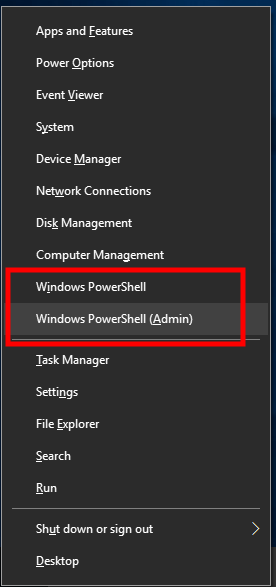
Then you tin act in two ways.
The start pick: you can merely drag-north-drop the executable file into the command window. The executable file is hashcat.exe or hashcat32.exe depending on your arrangement.
The second selection: on the command line, you can change the current working directory to the one where executable hashcat files are located. For case, my plan is located in the folder C:\Users\Alex\Downloads\hashcat-4.1.0\, to change the electric current working folder, use the cd command, afterward which the folder to which y'all specify the desired binder, in my case the command looks similar this:
cd C:\Users\Alex\Downloads\hashcat-4.ane.0\
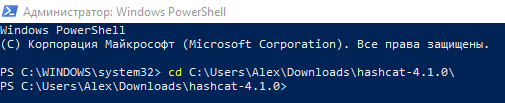
As you can meet from the screenshot, the folder C:\WINDOWS\system32 is changed to C:\Users\Alex\Downloads\hashcat-iv.1.0.
Now to offset the programme information technology is enough to type the name of the executable file indicating the current folder. The current folder is indicated by a period (.), So you need to put a backslash, it looks like this:
.\hashcat.exe

Since nosotros did non enter whatever options, nothing happens, only a brief hint is displayed.
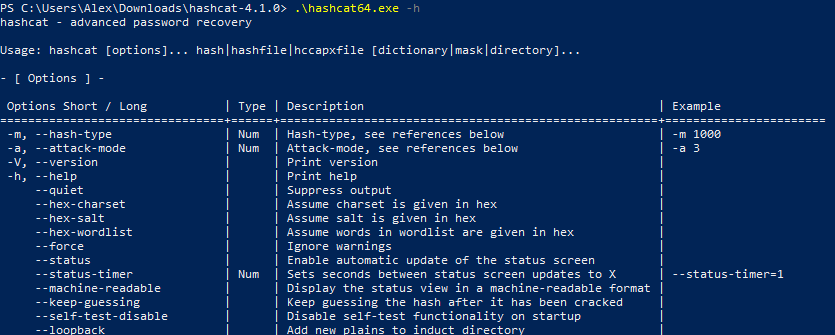
Throughout the instruction, we will run the executable hashcat file with options. The simplest pick is -h, if yous write it, you will get a reference for using the program:
.\hashcat.exe -h
Download hashcat
Download hashcat from the official site by the link: https://hashcat.internet/hashcat/
You will meet:

The site has hashcat binaries and hashcat sources. The first is binary (executable) files, the 2nd is the source code. We need binaries, i.e. hashcat binaries.
How to install hashcat
Hashcat does not require installation, since information technology is a portable program. It is enough to unpack the downloaded archive. If you have issues with unpacking the .7z format, then apply the program 7-Zip (archiver with a high pinch ratio).
To run hashcat, it is necessary that the latest drivers for video cards are installed.
Drivers for hashcat
Note: If you run Linux, then see the article "How to brute-force passwords using GPU and CPU in Linux" for instructions on installing the necessary drivers and packages.
The following graphics carte drivers are required:
- AMD graphics cards on Windows require AMD Radeon Adrenalin 2020 Edition (20.ii.2 or later)
- Intel CPUs require OpenCL Runtime for Intel Cadre and Intel Xeon Processors (16.1.1 or later)
- NVIDIA graphics cards crave NVIDIA Driver (440.64 or later) and CUDA Toolkit (nine.0 or later)
Instal the NVIDIA commuter
Go to NVIDIA official website https://world wide web.nvidia.com/Download/index.aspx, download and install the driver
Instal the CUDA Toolkit
Become to the official site https://developer.nvidia.com/cuda-downloads, download and install this toolkit.
Instal the Intel CPU video driver
Get to the official website https://www.intel.ru/content/www/ru/ru/download/19344/intel-graphics-windows-dch-drivers.html, download and install the driver
Install OpenCL Runtime for Intel
Direct link to "Intel CPU Runtime for OpenCL Applications for Windows OS" on Intel website: https://registrationcenter-download.intel.com/akdlm/irc_nas/vcp/17773/w_opencl_runtime_p_2021.2.0.616.exe
See the article for details: How to install drivers for Hashcat on Windows
Hashcat options
Working with programs in the command-line interface is very different from working in the graphical user interface. In the GUI, we press dissimilar buttons, move switches, etc. This is not the instance with programs with a command-line interface. Simply at the same fourth dimension the command line utility can take even greater capabilities than a like plan with a window interface. In gild to command the functionality of console utilities, options are used.
In the output of the aid you probably noticed a lot of data. This information is mostly devoted to the options.
Options are specified after the file name separated by a infinite. Some options crave specifying a certain value. Some are used without values (such options are besides called 'flags').
Options can be used one at a time or several at a time. With the assist of options you can very accurately configure the program, use it at maximum capacity.
With ane pick we have already met, it is the -h choice, which displays program assistance, then we'll get acquainted with even more options and their possible values.
The next i is the -b option.
Running the hashcat benchmark
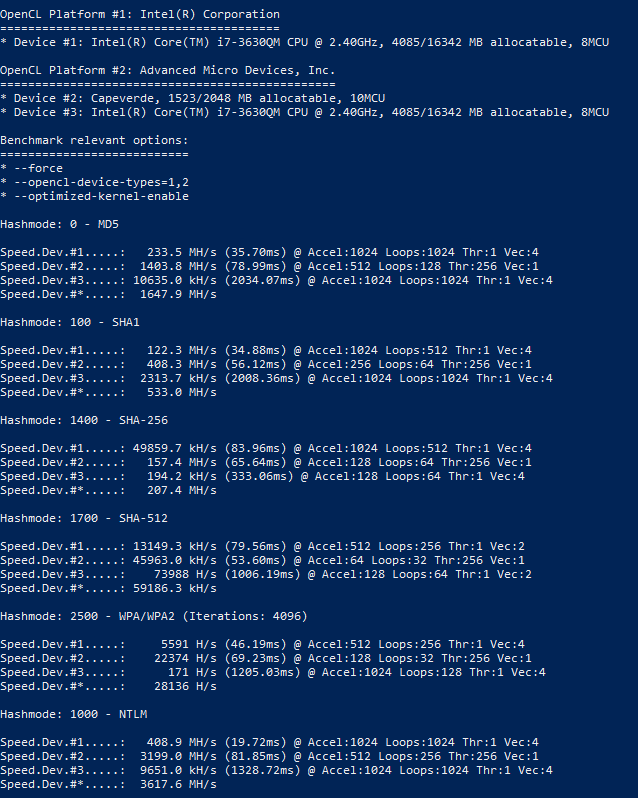
The -b option starts the hashcat benchmark. This benchmark measures the speed at which passwords are checked.
Running the benchmark will exist successful simply if the drivers are installed correctly and everything is all right. Therefore, a benchmark is also a way to do a organisation and hashcat bank check.
To run the brute-force speed check on the most popular algorithms on the command line blazon:
.\hashcat.exe -b
To stop prematurely, press CTRL+c. This shortcut stops all command-line utilities immediately. Recall this combination!
Speed is displayed for each device separately, every bit well as for all devices combined (line Speed.Dev.#*).
Example:
Hashmode: 2500 - WPA/WPA2 (Iterations: 4096) Speed.Dev.#ane.....: 5591 H/s (46.19ms) @ Accel:512 Loops:256 Thr:1 Vec:4 Speed.Dev.#2.....: 22374 H/south (69.23ms) @ Accel:128 Loops:32 Thr:256 Vec:i Speed.Dev.#3.....: 171 H/s (1205.03ms) @ Accel:1024 Loops:128 Thr:one Vec:4 Speed.Dev.#*.....: 28136 H/due south
Which device exactly corresponds a number is written at the very beginning when the programme is launched, for example:
OpenCL Platform #i: Intel(R) Corporation ======================================== * Device #1: Intel(R) Core(TM) i7-3630QM CPU @ 2.40GHz, 4085/16342 MB allocatable, 8MCU OpenCL Platform #ii: Advanced Micro Devices, Inc. ================================================ * Device #ii: Capeverde, 1523/2048 MB allocatable, 10MCU * Device #3: Intel(R) Core(TM) i7-3630QM CPU @ two.40GHz, 4085/16342 MB allocatable, 8MCU
Warnings and errors when running hashcat
Immediately upon starting the benchmark, errors tin start to be output. For example:
* Device #3: Non a native Intel OpenCL runtime. Expect massive speed loss. Yous tin use --force to override, but do not report related errors.
The error says that it is not the native runtime environment of OpenCL that is used, and a meaning speed loss is expected. For this reason, OpenCL devices will exist skipped (in the screenshot beneath it is visible past the word 'skipped'). If we want to use them anyway, we need to add together the --force option.
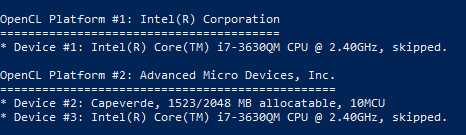
Running a benchmark with ii options:
.\hashcat.exe -b --force
If y'all yet miss some devices, and then you tin add one more selection -D. Afterward this option, you lot need to add a digit or digits indicating the blazon of device:
# | Device Blazon ===+============= 1 | CPU 2 | GPU 3 | FPGA, DSP, Co-Processor
Pay attention to a very important point: an uppercase letter is used for the option. Options are case sensitive. An capital letter may have another, fifty-fifty completely different meaning than lowercase letter.
So, 1 is the central processor, and 2 is the graphics processor, and so the full control, along with the option of all devices available for me, will look like this:
.\hashcat.exe -b --force -D 1,ii
The hashcat GUI
There are no official graphical interfaces for hashcat. Even so, at that place are several interfaces that were created by enthusiasts. The about relevant is this: https://www.hashkiller.co.united kingdom/hashcat-gui.aspx
To install the hashcat GUI, download the archive from the page to which the link above is linked.
Unzip the downloaded archive, information technology already includes:
- hashcat-utils-ane.0
- cap2hccap
Requirements for the hashcat GUI:
- only Windows operating system
- dotNET Framework: v4
- hashcat version 3.00 or later
Hashcat you need to download separately, as shown above. As well you need to have the necessary drivers installed.
Later on you lot unpack the Hashcat GUI and Hashcat itself, yous need to move the Hashcat folder to the Hashcat GUI folder. It should look like the following folder structure:
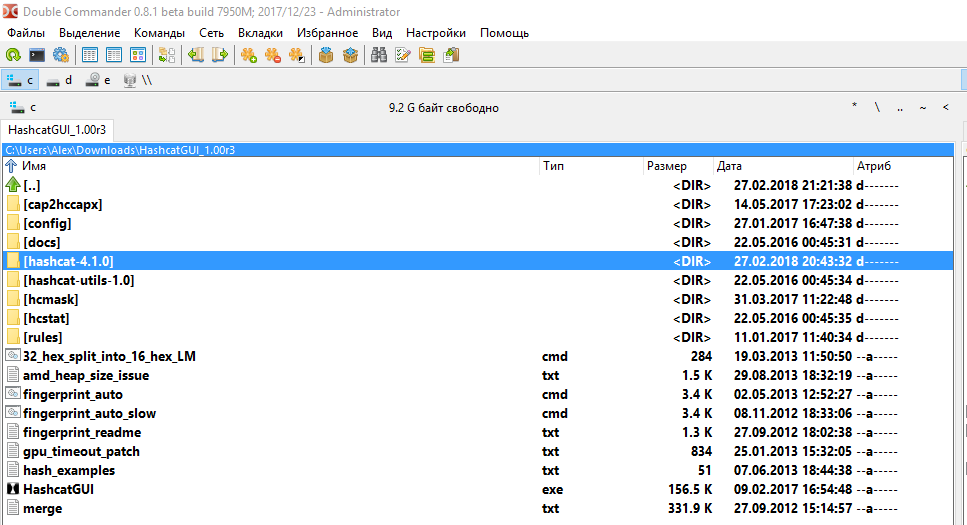
The binder with Hashcat-hashcat-4.1.0 is highlighted. Note that you lot practice not demand to rename the directory with a hashcat.
Double-click the HashcatGUI.exe file to start the program. Wait at the Hashcat GUI:
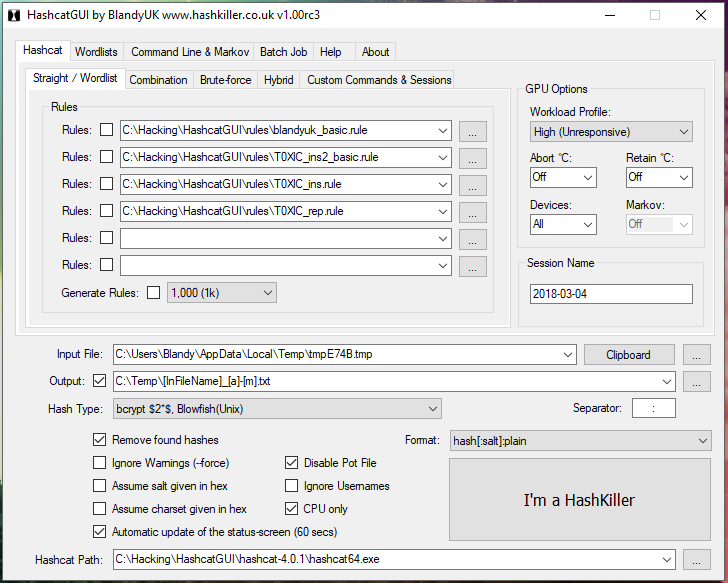
In my opinion, information technology is complicated. In my subjective sense, information technology is easier to accomplish the desired result in the control line than in the graphical interface, in which, by the style, some features are missing.
Moreover, without understanding the concepts of Hashcat, information technology's unlikely that you will be able to do something even in the graphical interface. Therefore, continue reading this article, and we will return to the graphical interface later on the pages of the miloserdov.org web-site.
How to use hashcat
The program runs equally follows:
hashcat [options]... hash|hashfile|hccapxfile [dictionary|mask|directory]...
Hither hashcat is the name of the executable file, in my examples it is .\hashcat.exe.
Divided by the space, options follow the executable file.
The symbol | (pipe) in this case means logical 'OR'. Therefore, hash, OR file with a hash, OR file hccapx file follows subsequently the options. And then lexicon OR mask OR directory follows the hash, depending on the called attack.
Consider the use of the program on specific examples. Suppose we have a hash of 53ab0dff8ecc7d5a18b4416d00568f02, which must be cracked. This hash is known to accept been obtained with the MD5 hash algorithm (i.east. it is MD5 hash). Information technology is as well known that the encrypted cord consists of only small letters of the English alphabet and has a length of six to ten characters.
Side by side, nosotros will bear witness you how to launch a password assail using a variety of tricks.
Specifying the hash type
Different hashes are computed using different algorithms. Similarly, their cracking is performed using dissimilar algorithms. In order to correctly launch an attack in Hashcat, you must specify the type of attacked hash. To practise this, use the -m pick, after which you must specify a number respective to the selected hash type.
In the baseline, we are given that the provided hash is MD5. So on the page https://en.kali.tools/?p=155 nosotros are looking for 'MD5':
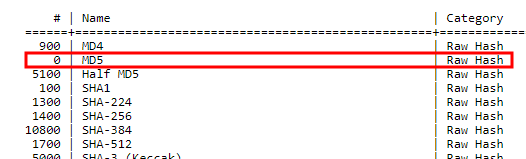
Reverse the found hash, look at the column '#', i.due east. number. In this example, this number is '0'.
So, to the Hashcat launch control, yous need to add together -one thousand 0, it is the pick and its value.
If we were given a SHA1 hash, so its number would exist 100 and to the Hashcat launch command we would add -k 100 and similarly for any other algorithm.
Typically, a hash type is known from the source where this hash was obtained. In instance the blazon of attacked hash is non known reliably, you can try to guess it with the help of specialized tools.
Hashcat Assail Modes
Hashcat supports various assault modes, the most common are:
- Dictionary attack when a list of words is used as password candidates
- Mask assault (brut-force), when candidates in passwords are generated based on the described criteria.
Apply the -a option to specify the attack way. With information technology, yous can specify any blazon of attack supported in Hashcat, the most popular is a dictionary attack which is indicated by the number 0, and a mask attack (brute force) which is indicated past the number iii.
Then if we run a dictionary assault, then we specify -a 0, and if nosotros run mask attack, so we specify -a 3.
Dictionary Attack in Hashcat
The attack starts with the lexicon every bit follows:
hashcat [options] hash|hashfile|hccapxfile path_to_dictionary
To crack our hash, create a small-scale lexicon: an ordinary text file named dictionary.txt and copy into it:
00001080 00001111 85be028 85cheyenne 85e6196a 85gpn aaaa1111 aaaa1113 aaaaa aaaaaa aaaaaa1 aaaaaa55 aaaaaaA1 aaaaaaa aaaaaaa7 aaaaaaaa aaaaaaaaaa aaabbb aaabbbc aaasss aaawin aab aabbccdd dancing2009 danciotu dandan1243 dandan44 dandans dandik06 slap-up dandy624 hackware nord8899 nordeng86 norderst nordikmix nordmann25 nordrein nordvik81 nordwich yw123123 yw19920 ywa5115 ywab1402 ywhjia4f ywidv ywj7516 ywjpheej
Note: By the manner, with Hashcat comes with an example of a dictionary, it's chosen case.dict.
So, at this phase nosotros take everything you lot need to launch an dictionary attack. Nosotros collect everything together:
.\hashcat.exe -thousand 0 -a 0 53ab0dff8ecc7d5a18b4416d00568f02 dictionary.txt
Here:
- .\hashcat.exe is a executable file
- -m 0 is an selection that sets the MD5 hash type
- -a 0 is an option, which value triggers a lexicon attack
- 53ab0dff8ecc7d5a18b4416d00568f02 is a hash to be cracked
- dictionary.txt is a path to the dictionary file.
Since the dictionary is very small, the programme will terminate its piece of work very quickly:
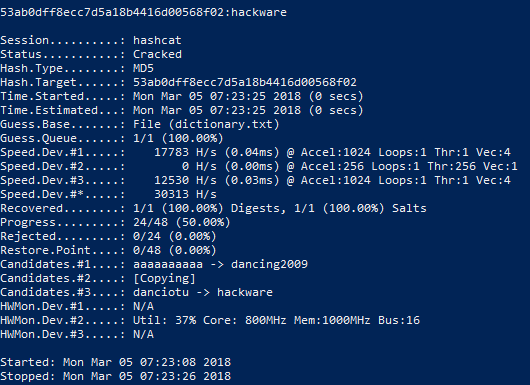
The issue of the program:
53ab0dff8ecc7d5a18b4416d00568f02:hackware Session..........: hashcat Condition...........: Cracked Hash.Blazon........: MD5 Hash.Target......: 53ab0dff8ecc7d5a18b4416d00568f02 Time.Started.....: Monday Mar 05 07:23:25 2018 (0 secs) Fourth dimension.Estimated...: Mon Mar 05 07:23:25 2018 (0 secs) Guess.Base.......: File (dictionary.txt) Guess.Queue......: i/i (100.00%) Speed.Dev.#i.....: 17783 H/s (0.04ms) @ Accel:1024 Loops:i Thr:1 Vec:4 Speed.Dev.#2.....: 0 H/southward (0.00ms) @ Accel:256 Loops:1 Thr:256 Vec:1 Speed.Dev.#iii.....: 12530 H/southward (0.03ms) @ Accel:1024 Loops:one Thr:1 Vec:four Speed.Dev.#*.....: 30313 H/s Recovered........: ane/ane (100.00%) Digests, 1/1 (100.00%) Salts Progress.........: 24/48 (50.00%) Rejected.........: 0/24 (0.00%) Restore.Signal....: 0/48 (0.00%) Candidates.#1....: aaaaaaaaaa -> dancing2009 Candidates.#2....: [Copying] Candidates.#three....: danciotu -> hackware HWMon.Dev.#ane.....: N/A HWMon.Dev.#2.....: Util: 37% Core: 800MHz Mem:1000MHz Charabanc:16 HWMon.Dev.#3.....: Northward/A
The showtime line is 53ab0dff8ecc7d5a18b4416d00568f02: hackware contains the attacked hash and afterward the colon the hacked countersign, in this case it is hackware.
On the successful hacking says the Status ………..: Cracked line
Hash does not need to exist specified in the control line, it can be written to a file, then when the assail is launched, the path to the file containing the hash is specified. For instance, create a hashmd5.txt file and copy into it 53ab0dff8ecc7d5a18b4416d00568f02.
So the command to run will exist:
.\hashcat.exe -m 0 -a 0 hashmd5.txt dictionary.txt
The command contains the same options as the previous i, but instead of straight hash, nosotros specified the path to the file containing the hash to fissure.
Note: since for educational purposes we crack the aforementioned hash in different ways, in example you repeat the examples, you will see the message:
INFO: All hashes plant in potfile! Utilize --evidence to brandish them.
It ways that the hash that you are trying to scissure has already been cracked earlier. All compromised hashes are stored in the hashcat.potfile file in the aforementioned directory as Hashcat. This is a apparently text file, yous can open it and see the contents, in my case it's:
53ab0dff8ecc7d5a18b4416d00568f02:hackware
This file can be deleted to starting time attack anew on the same hash in dissimilar ways.
At that place is also the option --show, after which you need to specify the hash of involvement:
.\hashcat.exe --show 53ab0dff8ecc7d5a18b4416d00568f02
and if it is found in the hashcat.potfile file, and so information about the cracked password will be displayed.
Mask attack in hashcat (animate being-force attack in hashcat)
In Hashcat there is no such mode as brut-force. He was alloyed by the mask attack. This is a more flexible type of attack, which allows yous to implement brut-forcefulness through finely tuned criteria.
In full general, the mask set on has the following form:
hashcat [options]... hash|hashfile|hccapxfile mask
Therefore, it is like to the previous one, only instead of the dictionary a mask is indicated.
How to brand masks in Hashcat
For composing masks, character sets are used. The character sets in Hashcat come in two flavors:
- Congenital-in Charsets
- User-divers Charsets
Let'south begin our acquaintance with the built-in charsets, for many cases, they are enough.
? | Charset ===+========= 50 | abcdefghijklmnopqrstuvwxyz u | ABCDEFGHIJKLMNOPQRSTUVWXYZ d | 0123456789 h | 0123456789abcdef H | 0123456789ABCDEF s | !"#$%&'()*+,-./:;<=>?@[\]^_`{|}~ a | ?l?u?d?s b | 0x00 - 0xff The first column denotes a symbolic symbol fix. For apply in masks, a question mark must be placed before this designation. For example, ?u means all uppercase letters,?d means all digits.
Suppose we know that the password consists of four characters, the first two characters are capital letter letters, and the third and fourth characters are digits, and so the mask volition be as follows:
?l?l?h?h
To crack the countersign from our hash given as an example, we need to create a mask consisting of viii characters, each of which is a pocket-sized letter. This is the mask: ?l?l?l?fifty?50?l?l?l
.\hashcat.exe -thousand 0 -a 3 53ab0dff8ecc7d5a18b4416d00568f02 ?l?50?l?fifty?l?50?l?50
Hither:
- .\hashcat.exe is an executable file
- -m 0 is an choice that sets the MD5 hash type
- -a 3 is an selection, which value triggers the mask attack
- 53ab0dff8ecc7d5a18b4416d00568f02 is a hash to be croaky
- ?fifty?l?50?l?fifty?l?l?fifty is a mask that specifies the generation of eight-character passwords consisting of small messages.
Less than a infinitesimal later on the countersign was successfully cracked:
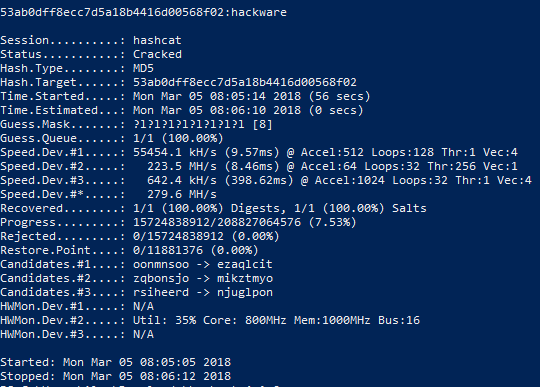
Pay attention to the line:
Progress.........: 15724838912/208827064576 (7.53%)
That is, 15724838912 variants of passwords from 208827064576 of the total number of variants were tested.
Mask for unknown password length
The password length is non always known exactly. Fifty-fifty by the status of our task, the password has a length of six to ten characters.
In order to generate passwords of dissimilar lengths, the following options are available:
Options Short / Long | Type | Description | Instance -i, --increment | | Enable mask increment mode | --increment-min | Num | Start mask incrementing at Ten | --increase-min=4 --increase-max | Num | Stop mask incrementing at X | --increment-max=8
The -i selection is optional. If it is used, information technology means that the length of candidates for passwords should not be fixed, it should increase past the number of characters.
The --increment-min option is too optional. It determines the minimum length of candidates for passwords. If the -i option is used, the --increment-min value is 1 by default.
And the --increment-max option is optional. It determines the maximum length of candidates for passwords. If the -i option is specified, just the --increment-max option is omitted, then its default value is the mask length.
Rules for using mask increment options:
- Before using --increment-min and --increment-max, you must specify the -i option
- the value of the --increment-min choice can be less than or equal to the value of the --increment-max selection, but can not exceed it
- the length of the mask can exist larger in the number of characters or equal to the number of characters specified by the --increment-max option, merely the mask length tin can not be less than the character length fix by --increment-max.
And then, we volition correct the launch command for our chore (the password has a length of six to ten characters):
.\hashcat.exe -thou 0 -a 3 -i --increment-min=6 --increment-max=10 53ab0dff8ecc7d5a18b4416d00568f02 ?l?l?l?l?l?l?l?50?l?l
This command is like to the previous one, just three new options have been added (explained just to a higher place):
- -i
- --increment-min=6
- --increment-max=10
And also the mask length is increased to 10 characters: ?l?fifty?fifty?fifty?l?l?50?l?fifty?l (as required by the rules for using increment options).
It took a bit more time to complete the search, as candidates in passwords of 6 (+1 seconds on my gland) and 7 symbols (+22 seconds) were tested in improver:
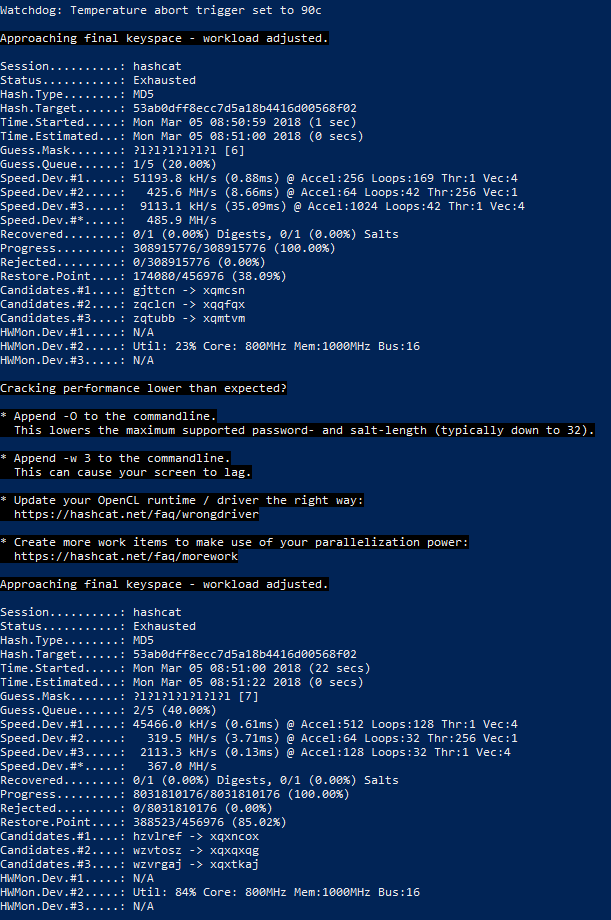
Note the new value of the Status line:
Status...........: Exhausted
It means that all the password candidates was tested, but none proved truthful.
Countersign cracking when some characters are known
There are situations when some of the password symbols are known. For example, we are given the same hash 53ab0dff8ecc7d5a18b4416d00568f02 and somehow we got to know that the first three characters in the password are 'hac'. Then you can specify these characters directly in the mask:
hac?l?l?50?l?l?fifty?fifty
The control is:
.\hashcat.exe -thousand 0 -a iii -i --increment-min=6 --increase-max=10 53ab0dff8ecc7d5a18b4416d00568f02 hac?fifty?l?l?l?l?l?l
Known symbols can be placed anywhere in the mask: in the start, in the eye, in the end; these can be single characters or groups of characters.
User-defined Charsets in Hashcat
Above, already listed are built-in graphic symbol sets, which are unremarkably enough. However, you tin can specify up to four of your own custom sets.
Suppose we know that the commencement 3 characters in the password are digits, and not all, but only numbers from 0 to 4, the fourth grapheme is only uppercase letters, and the fifth and sixth characters are the messages from a to h, also every bit the numbers from 5 up to 9.
If in the mask for the commencement three characters we but indicate the numbers, and so manifestly non suitable candidates for passwords (containing in the starting time 3 positions the numbers that are not in the range from 0 to 4) will be also tested. We must exclude obviously inappropriate passwords. This tin exist done using custom grapheme sets.
In that location are 4 user-divers character sets in full. They are specified in options and denoted by numbers. But in the options, a hyphen is placed before the digit (for example, the first user set is -1), and a question mark is placed in the mask before the digit (for example, the utilize of symbols from the showtime user set is ?1).
So, to solve the problem, nosotros start by setting the required number of user sets in the options. These sets can consist of directly listed characters, you lot can besides utilize congenital-in character sets, for case ?l or ?d or ?u (in whatsoever combination).
The first custom character set for our job (only numbers from 0 to 4):
-one 01234
The 2d user-defined character set (letters from a to h, as well as numbers from 5 to 9)
-2 abcdefgh56789
Allow me remind you - custom grapheme sets are written among the options (before the mask and before the hash).
Now create a mask (the kickoff three characters in the password are numbers, not all, but only the numbers from 0 to 4, the fourth character is but uppercase messages, and the 5th and sixth characters are the messages from a to h, too as the numbers from v to nine):
?one?1?1?u?2?2
We will detach the mask:- the kickoff three characters are designated as ?1?1?1 (these are units, and not a lowercase letter 50, they are digits 'i') are symbols from the starting time user set. Next goes ?u, this is a congenital-in character set up, cogent only capital letters. The adjacent two characters are designated as ?2?ii, these are symbols from the second user set.
When specifying custom sets, you lot can employ the annotation of built-in character sets, for example:
-1 ?l?u
denotes the commencement user set consisting but of big and small Latin letters.
And
-ane ?l?u?d
ways the get-go user set consisting just of large and modest Latin letters, also as numbers.
As already shown above, yous can use custom and built-in character sets in any combination in the mask.
How to show passwords (create a dictionary) in Hashcat without launching a nifty
Afterward creating complex masks, especially with the use of custom graphic symbol sets, we would like to check whether nosotros did everything correctly. Also, thanks to the flexibility of the Hashcat syntax, it is user-friendly to use it for generating dictionaries by whatsoever criteria.
In order to but evidence passwords without starting dandy, the --stdout selection is used. This option requires -a three (masd attack fashion). Since cracking does non starting time in this case, you lot do not need to specify any hashes.
An example of generating passwords for the in a higher place-mentioned task (it is known that the get-go iii characters in the password are numbers, not all, but simply numbers from 0 to 4, the quaternary character is only uppercase letters, and the fifth and sixth characters are the messages from a to h, every bit well as numbers from v to 9):
.\hashcat.exe --stdout -a 3 -1 01234 -2 abcdefgh56789 ?ane?1?ane?u?2?ii
Since many passwords volition be created (more than half a meg), instead of displaying on the screen, they can exist saved to a file. To do this, after the principal command, you need to put the symbol > (means redirecting the output to a file) and write the file name. For example, to salvage all passwords to the lab1.dic file, which volition be created in the aforementioned folder equally the executable hashcat.exe:
.\hashcat.exe --stdout -a 3 -1 01234 -2 abcdefgh56789 ?1?1?1?u?2?2 > lab1.dic
How to create a mask if nothing is known nearly the password
If you do not know what characters are in the password, as well as how long it is, you have to become through all possible countersign candidates.
3 assumptions tin can exist conditionally distinguished:
- The password can contain whatsoever numbers, besides as upper and lower case letters.
- The password can contain whatsoever numbers, uppercase and lowercase letters, too as other symbols (periods, dashes, commas, quotes, spaces, percent signs, hash marks, etc.)
- The password tin can contain any numbers, upper-case letter and lowercase letters, other symbols (periods, dashes, commas, quotes, spaces, percent signs, hash marks, etc.), likewise equally letters of national alphabets (Cyrillic, hieroglyphs, etc.).
What is the problem with asking search for a password for all characters at once? Let's plough to the formula for the number of possible combinations:
number of characters(password length)
That is, the number of possible characters in the countersign to the power of a number, which is the length of the password. Moreover, if we practise non know the length, then it is necessary to brute-force
(number of characters)1 + (number of characters)two + (number of characters)iii + (number of characters)iv + (number of characters)five + …
That is, you demand to iterate over all passwords that are one grapheme long, then all passwords that are 2 characters long, and and then on.
In practice, for many cracking algorithms, this means that information technology is incommunicable to approximate the password in a reasonable fourth dimension.
Therefore, if you lot have no idea about the password, then perhaps you can get-go with a dictionary set on. Information technology may turn out to be more efficient than waiting billions of years for brute-force passwords.
However, if you need to run a brute-forcefulness assault, when the countersign can contain uppercase and lowercase Latin letters, also as numbers and countersign length from 1 to 12, then yous need to utilize the following options and mask:
-i --increase-min=1 --increment-max=12 -1 ?l?u?d ?1?i?1?1?1?1?ane?i?1?1?1?ane
To listing all password candidates or store them in a dictionary:
hashcat --stdout -a iii -i --increment-min=1 --increment-max=12 -1 ?fifty?u?d ?one?ane?1?1?1?1?1?1?1?1?1?i
If y'all need to run a brute-force attack when the password can comprise uppercase and lowercase Latin letters, numbers, and symbols !"#$%&'()*+,-./:;<=>?@[\]^_`{|}~ and the countersign length is from ane to 12, then you demand to use the post-obit options and mask:
-i --increment-min=i --increase-max=12 ?a?a?a?a?a?a?a?a?a?a?a?a
To list all countersign candidates or shop them in a dictionary:
hashcat --stdout -a 3 -i --increment-min=1 --increment-max=12 ?a?a?a?a?a?a?a?a?a?a?a?a
Samples of hashes
The Hashcat program includes not only help, simply also hash examples. They tin can be useful if you have difficulty in correctly writing the hash format.
To brandish all examples of hashes at in one case, run the program with the option --case-hashes:
.\hashcat.exe --example-hashes
Y'all can meet a sample of one particular hash. For example, I need to discover out what a hash looks similar to crack the RAR5 password; then I turn to the assistance page of the program https://en.kali.tools/?p=1558 and search for RAR5 (use CTRL+f). I observe that the number of this hash is 13000; Side by side, I run the program with the pick --example-hashes and the already-known option -m (afterwards which the hash style number is specified)
.\hashcat.exe --example-hashes -m 13000

And then, to fissure passwords from RAR5 athenaeum, the hash should look like:
$rar5$sixteen$38466361001011015181344360681307$15$00000000000000000000000000000000$8$cc7a30583e62676a
Source: https://miloserdov.org/?p=953
Posted by: englishwilout.blogspot.com
0 Response to "How To Use Hashcat On Windows"
Post a Comment